Losing messages from your iPhone can be problematic, especially when those messages hold personal memories, work-related information, or legal advice. Although Apple provides backup tools such as iCloud and iTunes to restore deleted data, these methods won’t work when no recent or sufficient backup of the lost messages exists.
Fortunately, even without a backup, there are still methods and practical tips that can help increase the chances of recovering deleted iPhone messages. This article explores different practical tips to recover iPhone messages without backup. Let’s get started!
What Happens When iPhone Messages Are Deleted?
Before you proceed with an adequate iPhone data recovery method to restore deleted messages, it’s important to understand what happens when messages are deleted. When you delete a message on iPhone, either intentionally or by mistake, it is not immediately erased from the device’s storage. Instead, iOS marks the space occupied by the message as “available for reuse.” You may be able to restore deleted messages until new data overwrites the space occupied by them.
This is why acting quickly is very crucial for smooth recovery. The sooner you act, the easier it will be for you to restore lost messages. Using your iPhone after message deletion—such as sending texts or installing apps—can overwrite the deleted data, making recovery impossible.
Immediate Steps to Take After iPhone Message Deletion
When you find your messages are deleted from your iPhone, avoid saving new files on it. Do not:
● Send or receive new messages
● Install or update the apps installed on your iPhone
● Taking photos or recording videos
● Downloading files
This may overwrite deleted messages and reduce the chances of successful recovery.
Turn ON Airplane Mode
Enabling Airplane Mode prevents background processes, notifications, and automatic syncing that could overwrite deleted messages. This is especially useful if the deletion occurred recently.
Avoid Resetting the iPhone
It is a common misconception that resetting the iPhone after message deletion can help recover lost messages. A factory reset:
● Erases all remaining traces of deleted messages
● Makes recovery nearly impossible
● Eliminates temporary cached data
How to Recover Deleted Messages on iPhone without Backup?
Now that you know why acting immediately is crucial for smooth recovery, it’s time to apply adequate methods to restore your lost messages. You can apply the below methods one by one to recover your lost messages even without backup:
Method 01: Check the Recently Deleted folder in Messages App
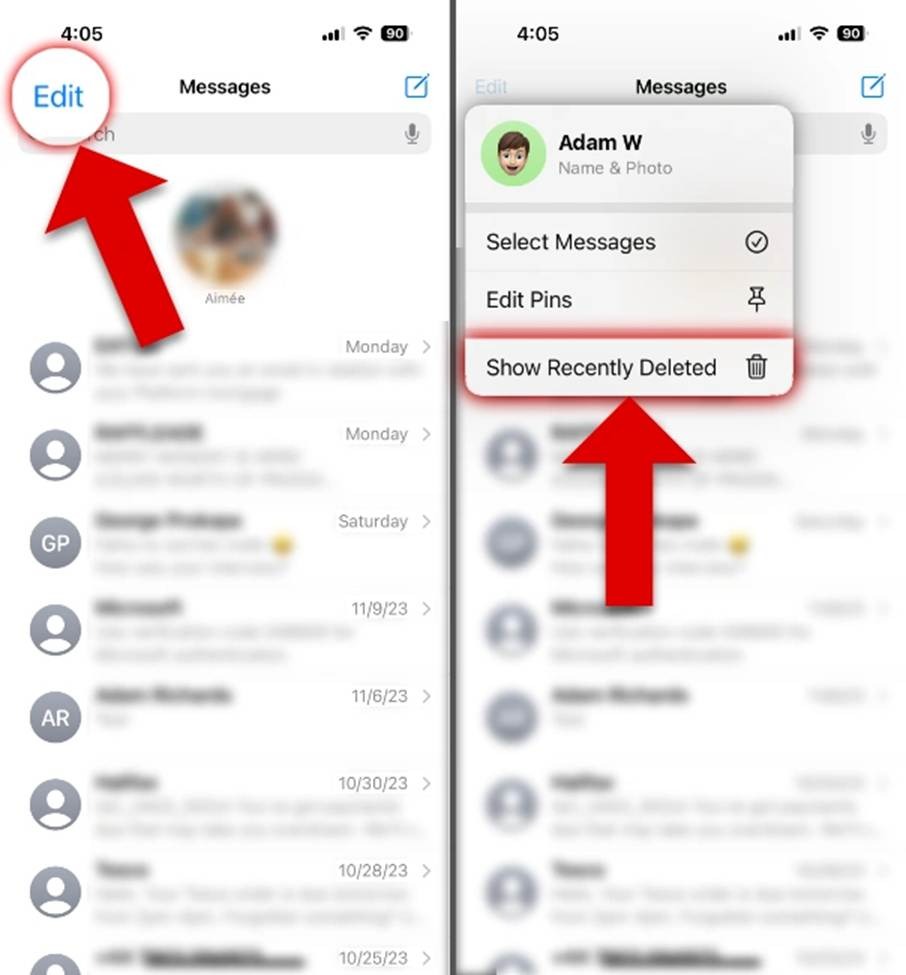
The latest iOS version (iOS 16 and later) comes with an in-built Recently Deleted section in the Messages app, which temporarily stores your deleted texts. Here’s how to access it:
● Open the Messages app on your iPhone.
● Click Edit (or Filters) from the top-left corner.
● Tap on “Show Recently Deleted” and go through all the deleted messages.
● Select the one you want to restore and click Recover.
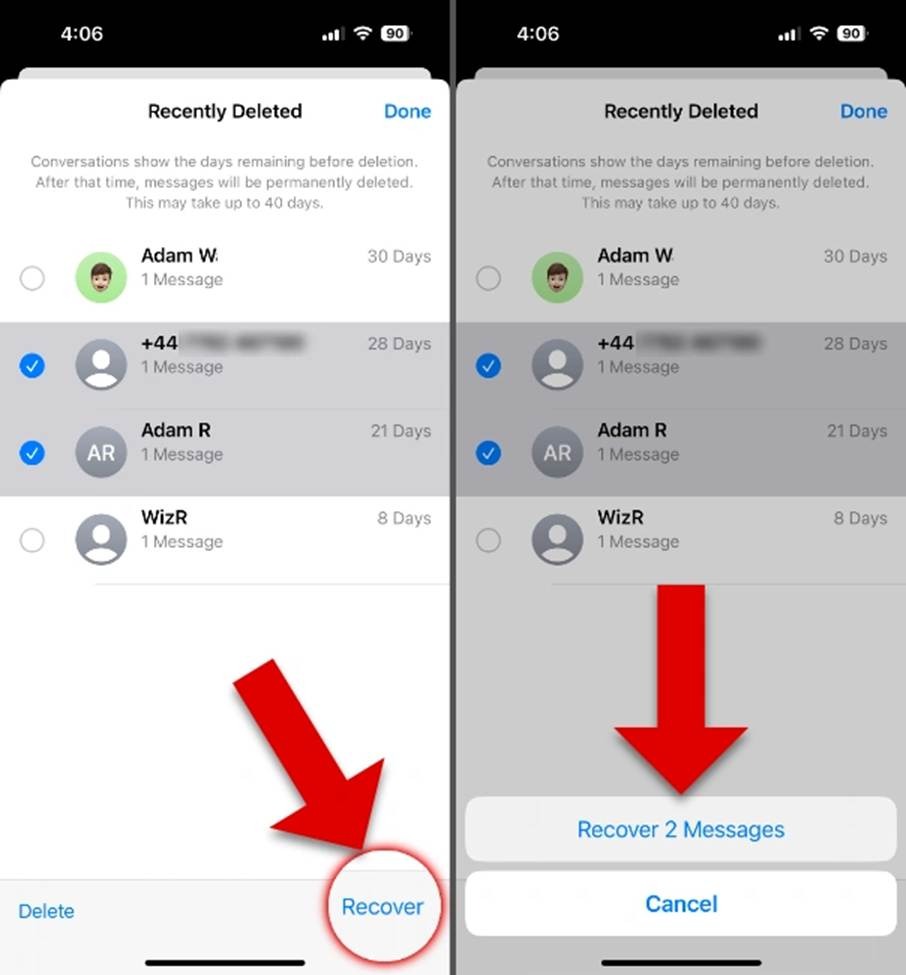
This will save the restored messages back to the app. However, if your message is not in the Recently Deleted folder, it might have been permanently erased.
Method 02: Recover Messages Using iPhone Data Recovery Software
If your deleted messages are not in the iPhone’s Recently Deleted folder, then you can try third-party iPhone data recovery software to restore them. Tools like Stellar Data Recovery for iPhone can help you restore deleted photos, videos, text messages, and other types of files in a few simple clicks. This software is specifically designed to scan your iOS devices or existing system data to locate and recover deleted data. The software supports recovery of both SMS and iMessage, including message attachments in many cases.
Key Features of Stellar Data Recovery for iPhone Tool:
● The Stellar Data Recovery for iPhone software is known for its user-friendly interface, which makes the recovery process simple even for non-technical users.
● The software supports recovery of lost messages in three simple steps, i.e., Select, Scan and Recover.
● The preview feature of this tool lets you preview the recoverable files before saving them on your device.
● This software is available in multiple versions, varying in features and prices.
● It is compatible with iPhone series 17/16/15/14/13/12/ and below.
Here’s how to recover deleted messages using this amazing iPhone data recovery tool:
Step 1: Download and install the Stellar Data Recovery for iPhone software on your computer. Also, connect your iPhone to that PC using a USB cable.
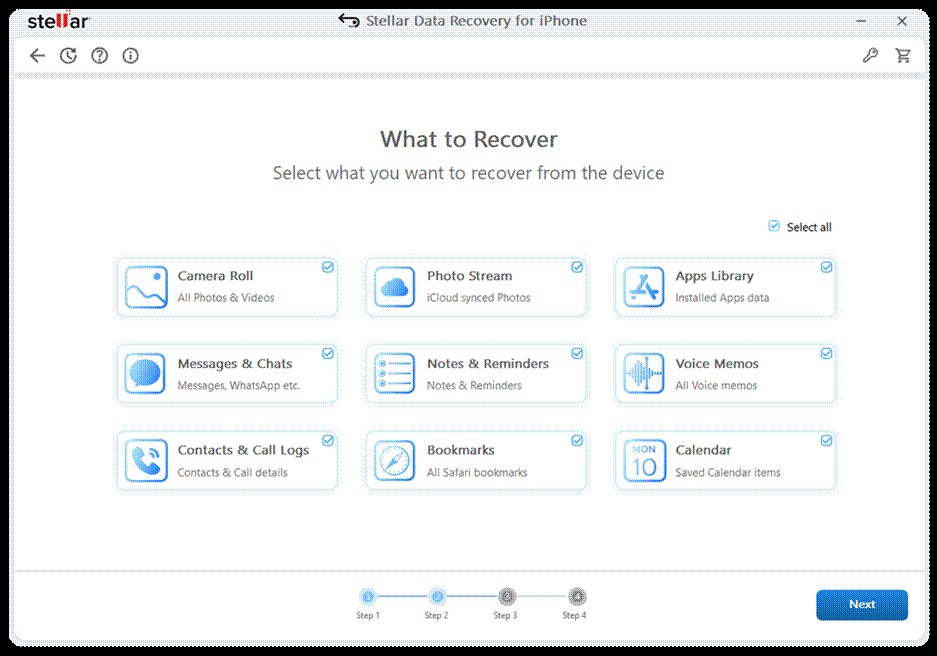
Step 2: Select Messages & Chats (as you need to restore deleted iPhone messages) and click Next.
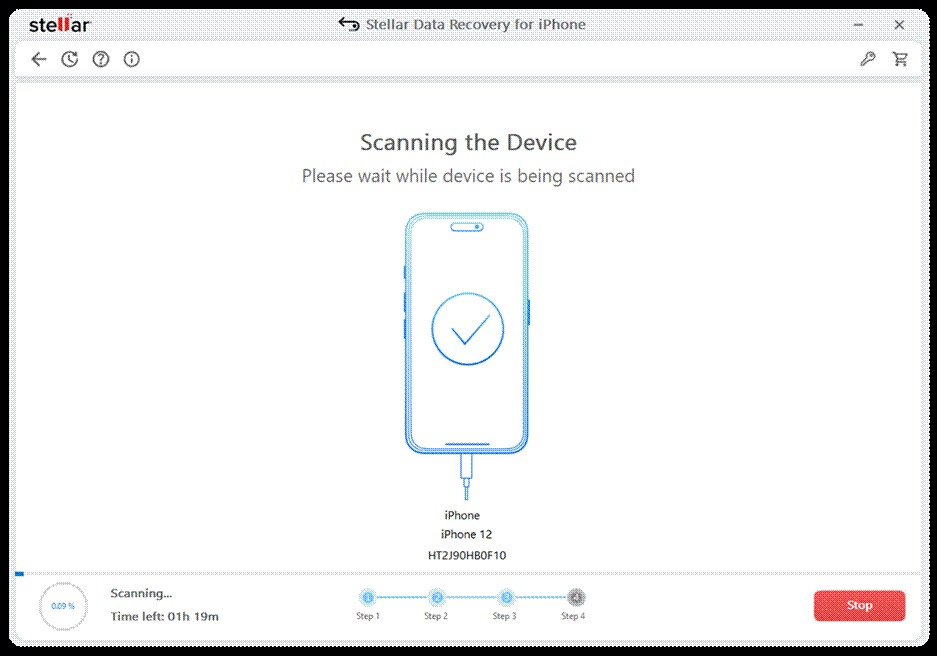
Step 3: Now, tap Scan to initiate the scanning process and wait till it is completed. Once done, preview the deleted messages found by the software.
Step 4: Select the message(s) you want to recover and click Save to save selected messages on your device.
Note: Try saving your recovered messages to a different location in order to prevent overwriting of any other deleted data.
Wrapping Up
Recovering iPhone messages without backup tools seems challenging, but there’s no need to worry. Acting quickly, understanding how iOS handles deleted data, and using built-in features like Recently Deleted folders can significantly improve your chances of quick message recovery. If the deleted messages are no longer available there, third-party iPhone data recovery software like Stellar Data Recovery for iPhone can be considered. More importantly, adopting preventive habits—such as enabling message retention and iCloud sync—can save you from future data loss.
Frequently Asked Questions (FAQs)
Is it possible to recover deleted messages on an iPhone without backup?
Yes, it is possible in some cases. If the messages are available in the Recently Deleted folder or synced on another Apple device, they can be recovered without a backup. Recovery chances depend on how quickly you act after deletion.
How long do deleted iPhone messages stay recoverable?
It is possible to recover lost messages on an iPhone until they are overwritten by new data. Messages in the Recently Deleted folder are usually stored for up to 30–40 days, depending on iOS settings.
Can I recover messages deleted a long time ago?
Recovery becomes unlikely if messages were deleted long ago, especially if the iPhone has been used regularly since then. You may need to use third-party iPhone data recovery software to restore lost messages without any effort.